I've started to prepare the Subversion stuff I've blogged about here for release as open source.
I've submitted project registration to Sourceforge. The project, if approved, will be called delphisvn and will be released under Mozilla Public License 1.1.
Update: Yay, I've just uploaded the initial release to SourceForge! :-)
Thursday, June 22, 2006
Wednesday, June 21, 2006
More Subversion
In the recent few days, I've been able to spare some time for my Subversion IDE plugin again. I've written a dockable IDE form which can be used to perform some actions and view their results. If you're interested in how to write a dockable IDE form, see Corbin's article and example. Who knows, perhaps this plugin might actually become useful one day ;-)
See for yourself, in the screenshots below.
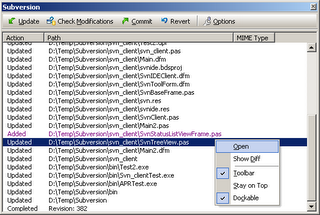
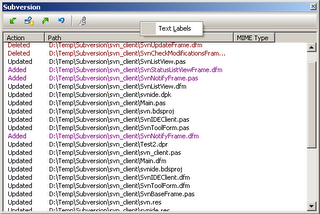
Here you can see that the form inherits from Delphi's internal
The top two menu items are my own: Open will open the file in the IDE, and Show Diff will open its history view and show the differences between the local copy and the base revision.
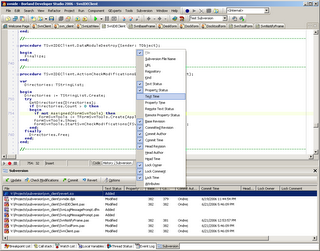
I'm using Mike Lischke's excellent Virtual Treeview and I've noticed it's already also used by the IDE, e.g. in the Project Manager.
The columns can be moved, resized, shown or hidden. Their state is saved as part of your desktop (*.dst files in $(BDS)\bin directory). The treeviews can be sorted by individual columns by clicking on the header.
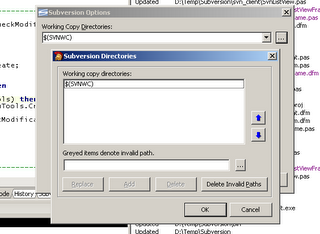
The Options dialog uses Delphi's internal dialog (
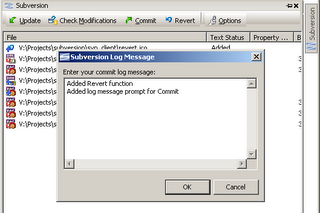
Here's a prompt for a commit log message.

Finally, the results of the Commit action.
See for yourself, in the screenshots below.


Here you can see that the form inherits from Delphi's internal
TDockableToolbarForm.The top two menu items are my own: Open will open the file in the IDE, and Show Diff will open its history view and show the differences between the local copy and the base revision.

I'm using Mike Lischke's excellent Virtual Treeview and I've noticed it's already also used by the IDE, e.g. in the Project Manager.
The columns can be moved, resized, shown or hidden. Their state is saved as part of your desktop (*.dst files in $(BDS)\bin directory). The treeviews can be sorted by individual columns by clicking on the header.

The Options dialog uses Delphi's internal dialog (
TOrderedListEditDlg) to edit the list of Subversion working copy directories.
Here's a prompt for a commit log message.

Finally, the results of the Commit action.
Wednesday, April 05, 2006
Subversion editor view

Today I've played with the idea of a new Subversion editor view in the Delphi 2006 IDE.
To add a new editor view to the editor, you have to implement
ICustomEditorView interface and register it with a RegisterEditorView call.You'll need to add
EditorViewSupport unit to your uses clause. This unit is only available through designide.dcp; there is no source code. But you can use Code Insight and Help Insight to see what methods are declared in the interface:
  TSvnEditorView = class(TInterfacedObject, ICustomEditorView, ICustomEditorFrameView)
  private
    { ICustomEditorView }
    function GetCanCloneView: Boolean;
    function GetCaption: string;
    function GetPriority: Integer;
    function GetStyle: TEditorViewStyle;
    function GetViewIdentifier: string;
    procedure Display(const AContext: IInterface; AViewObject: TObject);
    function EditAction(const AContext: IInterface; Action: TEditAction; AViewObject: TObject): Boolean;
    function GetEditState(const AContext: IInterface; AViewObject: TObject): TEditState;
    function Handles(const AContext: IInterface): Boolean;
    procedure Hide(const AContext: IInterface; AViewObject: TObject);
    procedure ViewClosed(const AContext: IInterface; AViewObject: TObject);

    { ICustomEditorFrameView }
    function GetFrameClass: TCustomFrameClass;
  end;
Subscribe to:
Posts (Atom)