Showing posts with label DataSnap. Show all posts

Saturday, June 09, 2007

DataSnap to the rescue

I'm maintaining a custom setup program used to install applications. In some cases it needs to perform actions which require administrative privileges, e.g. writing into Program Files directory, or modifying the registry under HKEY_LOCAL_MACHINE.

On Windows Vista, the privileges can be acquired by elevation. However, elevation actually switches the user context; but the setup program also needs to perform some actions within the context of the current user: create registry entries under HKEY_CURRENT_USER, copy files into their "My Documents" folder, etc. This means that I cannot simply use manifest to request administrator privileges statically.

Therefore, elevation needs to take place dynamically at runtime. COM elevation moniker can be used for this purpose. This blog post is very useful in that regard. (Thanks, Aleksander!)

So I've written an ActiveX DLL, an automation object with methods to expose file streams, create and delete directories, access registry and so on - things which need to be done under an administrator's account.

But then I realized that this would require two UAC prompts: first to register the ActiveX DLL (and it does have to be in the registry, registration-free activation doesn't seem to suffice in this case), and second to actually use the elevation moniker.

To show only one UAC prompt, I decided to use two separate processes: server running elevated (via manifest) and client running under the current user's account. Since I already had written the automation object, I decided to reuse it. For the inter-process communication, I decided to use DataSnap with TSharedMemoryConnection (a memory-mapped file transport) which I've written for the purpose.

To reduce unnecessary registry clutter, instantiation of the COM class in the server process is simplified, no CoCreateObject is called and therefore no registration is required. Instead, the type information needed to dispatch method calls is used from the type library resource directly.

The client has the server linked in as a resource; if it detects that it's not running with sufficient privileges it extracts it to a temporary directory and launches it from there.

It all works very nicely and, IMHO, is another example of how powerful and flexible DataSnap is.
Monday, February 06, 2006

CC2209 fix

I've just fixed a memory leak in my entry #2209, titled "Access client's IP address from a DataSnap remote data module" on Borland's CodeCentral.

The problem was on the COM server side, in the included DSnapCom unit. The client's IP address (passed in by httpsrvr.dll or scktsrvr.exe as an additional BSTR parameter) was not released properly, which caused a few bytes of memory leak for each method call.

Looking back, this bug seems pretty obvious, and it seems strange that I didn't discover it at the time when I wrote the code. I was under the impression that I had tested everything properly. Duh!

Oh well. It's back to testing then. (I've discovered this while trying to solve another problem which might or might not be related to it.)

Wednesday, September 14, 2005

Could not find server in ObjectManager list

You can register your DataSnap appserver as stateless by calling RegisterPooled in the overriden UpdateRegistry class method of your remote data module.The problem with the way httpsrvr.dll manages stateless objects is that, ehm, it's stateful. ;-) More precisely, it's stateless only within a single IIS session.

The Object Manager uses a stringlist of class IDs and each item contains a list of instances of that class. Here is a brief summary of what happens between the client (TWebConnection) and the server (httpsrvr), in case of stateless/pooled appservers:
  1. The client sends asCreateObject request with the appserver's CLSID to the server. (see TStreamedConnection.DoConnect).
  2. The server checks its list of CLSIDs (creating a new item if it does not exist) and return its index within the list back to the client. No instance of the class is created at this point.
  3. The client stores the returned integer value which is used to identify the class in subsequent asInvoke (method call) requests.
  4. The client sends a asInvoke request to execute a method remotely on the appserver. (The communication between a TClientDataSet and a TProvider also works via remote method calls, the relevant methods are defined in the IAppServer interface which is implemented by all TRemoteDataModule descendants.)
  5. The server checks its list of CLSIDs, finds the entry and checks its instance pool for any unlocked (ie. not currently processing a request) instance. In case no idle instance can be found at the moment, it will create a new one, up to the maximum size of the pool you specified in your RegisterPooled call. (In case all instances are locked and the pool is already at its maximum size, the server will return a "Server is busy" error.)
  6. The client may send additional asInvoke requests as needed. The server dispatches the calls to any currently idle instance in the appropriate pool. Hence, your appserver logic must be stateless, ie. it cannot assume that any context is preserved between the calls since they may be executed by different instances.
  7. Cleanup on the server is performed by a separate garbage collector thread which releases any unused instances after a specified timeout. Even if no instance is any longer active (the pool size drops to zero), the item in the list of CLSIDs remains unchanged so clients may issue additional requests; these will be served by instances created on demand.
  8. When the client is finished with the appserver, it will send an asFreeObject request (see TDataDispatch.Destroy which is called due to reference counting). If the appserver has been registered as stateless, the server does not release any instance at this point - rather, the instances are kept in the pool, ready to serve additional requests or eventually be released by the garbage collector.

But what happens if you restart IIS anywhere after step 3? Sure, upon receiving another HTTP request with a relevant URL, IIS will load and run httpsrvr.dll again, but the Object Manager's list of CLSIDs is empty after a fresh start; the integer value sent by the client makes no sense since it cannot be resolved to a CLSID. This is the case when the server sends the "Could not find server in ObjectManager list" error back to the client. In an even worse case, if other clients have sent requests in the meantime, the list indexes may be different so the call will be dispatched to an instance of a different class, which will probably result in some COM exception because of the (very probable) typeinfo mismatch. (In a yet worse scenario, think about what happens when the method dispatch IDs and signatures of the two different appservers match by coincidence. ;-)) In either case, from the client's point of view, important state information (the association between the CLSID and its token) is lost.

So how can this problem be solved? I can imagine two options:

  1. Modify the DataSnap code so it never uses the tokens. Let the client pack the CLSID with every call. The disadvantages of this approach are:
    • GUIDs take 16 bytes, as opposed to 4 bytes for an integer.
    • All your client executables out there will become obsolete/incompatible with your appservers; you'll have to recompile and redistribute them.
  2. Modify httpsrvr.dll so it ensures that the token values don't change from one IIS session to another. This can be done by preloading the list in the initialization and not on demand so the index values are not dependent on the order in which clients send requests.

I have chosen the latter option. To preload the list of registered appservers, I use the (slightly modified) GetMIDASAppServerList procedure from the MConnect unit. The thousands of already distributed client applications will continue working as before; in addition, I can restart my web server between their calls without interrupting their work.

Tuesday, February 08, 2005

HTTPSRVR with Apache

Interesting: HTTPSRVR with Apache. On Windows only, of course. I should try it when I find the time.

Tuesday, October 12, 2004

DataSnap.NET

About a week ago, I had an idea of porting the server part of DataSnap framework to .NET. Since then I've been fiddling with it in my free time, using Borland's C#Builder Personal Edition which is free for non-commercial development. Today, my first prototype of a (stateful) managed socket server is ready. So far, it's able to serve the following requests:
  • asGetAppServers: retrieve ProgIDs of installed appservers (thanks to Andrey Alifanov for this excellent article about using the COM Category Manager from .NET via interop)
  • asCreateObject: create instances of COM appservers
  • asFreeObject: release said instances
  • asInvoke: call simple methods, e.g. AS_GetProviderNames, AS_GetRecords (loading a client dataset works), as well as some simple custom methods of my test appserver.
An ASP.NET equivalent of httpsrvr.dll is also in the works (asynchronous HTTP handler, using the thread pool) but first I'd like to finish the common (transport-neutral) library which is responsible for marshalling DataSnap calls across wires via data packets.

I still have to debug and test marshalling of all possible parameter types (including multidimensional variant arrays, records, enums, byref parameters and so on). It seems to be easier to debug this code within the socket server which is a simple managed WinForms application.
A lot of my current code is, most probably, terribly inefficient, with lots of boxing and unboxing going on (first, data is read from the data packet stream into managed type variables which are then marshalled to unmanaged COM appservers, results unmarshalled to managed variables and streamed back to client). At this stage, I'm focusing purely on functionality; optimization can wait ;-).

What's the purpose of this work? Most of all, I'm doing it for my own fun and education. I'm still a beginner in .NET and this is a nice way for me to become more familiar with it. I have also acquired a bit deeper knowledge of this cool library called DataSnap.

Monday, September 27, 2004

Client dataset to .NET dataset

CC #21053: A great Delphi 8 project with source code written by Petr Vones. It can load a client dataset XML datapacket into a .NET dataset.

Monday, September 20, 2004

CC #22334

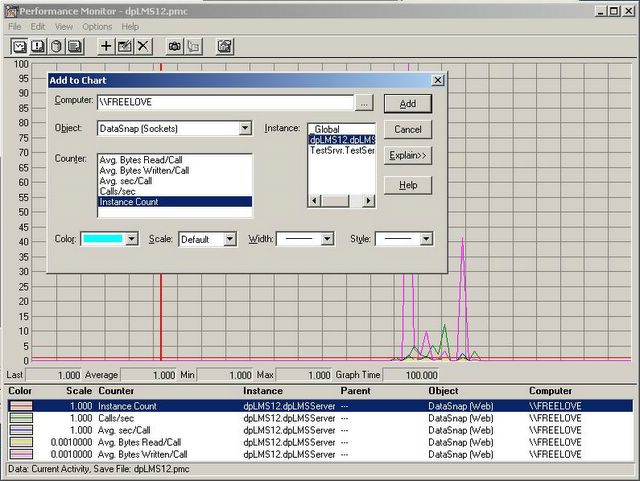
Today I posted two performance counter libraries for instrumenting DataSnap appservers (one for sockets, one for HTTP transport) to CodeCentral.

Saturday, September 18, 2004

CC #22332

Today I posted an example of creating a custom performance counter library to CodeCentral. I'm preparing my DataSnap performance libraries for publishing as well.

Thursday, September 02, 2004

PerfMon ready


My DataSnap appserver is now instrumented. In fact, my performance counter libraries are generic and will work with all DataSnap servers installed on the computer. DataSnap class IDs are read from the registry and a separate performance object instance is created per each class ID.
I have created two performance counter DLLs, one for web (httpsrvr.dll) and another for socket (scktsrvr.exe) transport.
I'm looking forward to watching the graphs later this month; some serious load is expected on our website when the users are back from their vacations.

Links to the source code:
Custom Performance Counters
Performance counter libraries for DataSnap appservers

Tuesday, July 27, 2004

CC #22009

Today I posted to Borland's CodeCentral an example which shows a possible way to access client IP address from a DataSnap remote data module.

Monday, July 19, 2004

QC #8664

I've just posted this report to Borland's QualityCentral.
Under certain circumstances, httpsrvr.dll may make one additional, superfluous call to ReadClient after all data has already been read. In such case, the call will time out after 60 seconds.
Only happens if the client request content length is so big (from my tests, >48K) that it has to be read in chunks.